Your first PostBakery post: from sign-up to publishing
A real step-by-step example: an e-bike shop, a Coswheel R19 in front of Sofia's Alexander Nevsky Cathedral, the brand's logo and a ready caption — in under 10 minutes.
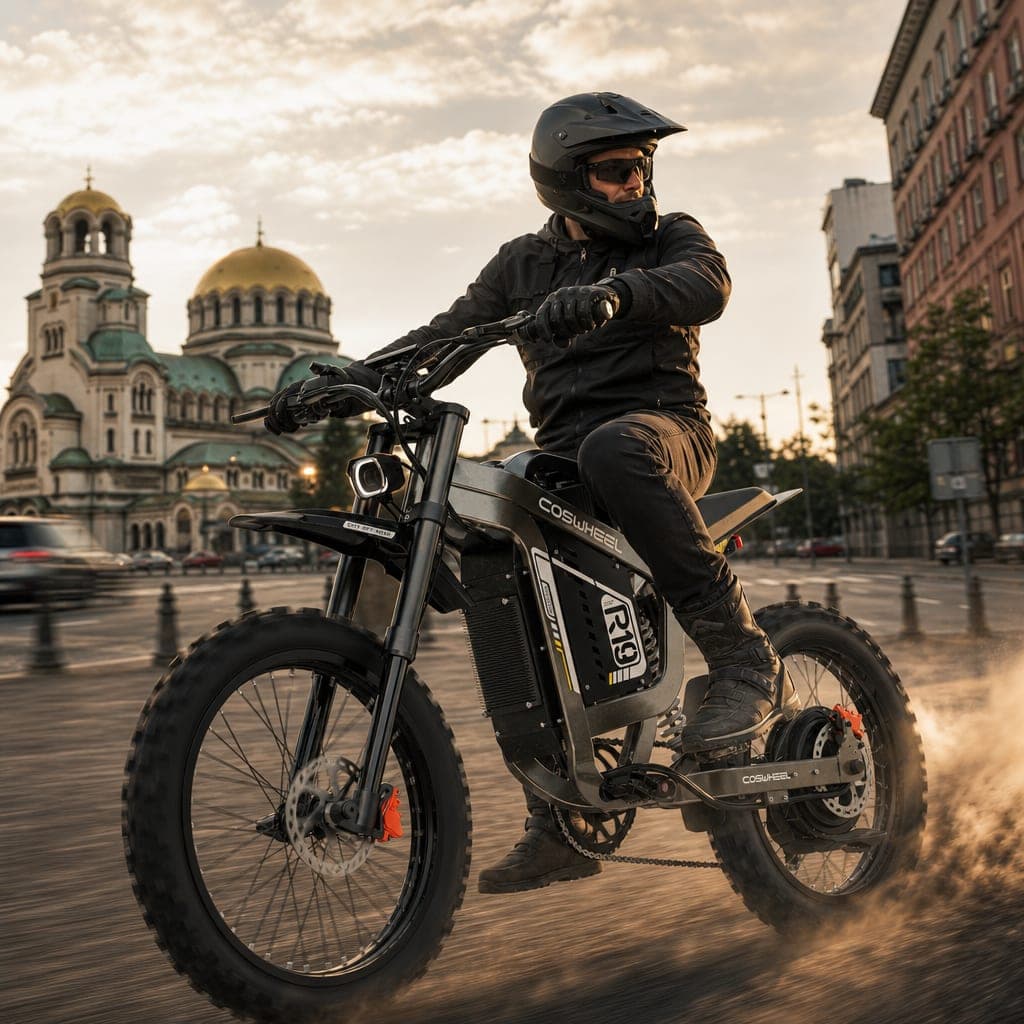
The example in this guide is real. Electric Express sell electric bikes in Sofia, Bulgaria, and agreed to let us share their first PostBakery post: a Coswheel R19 electric dirt bike in front of the Alexander Nevsky Cathedral, with a rider, a sunset and the shop's logo in the corner. The photo we started from is a studio shot — the bike on a white background.
We'll walk the whole way: sign-up, brand, logo, product photo, description, generation, fine-tuning and publishing. You won't need a designer, a template or a free hour. The free plan gives you 3 posts without a credit card — exactly enough to try it with your own product.
Step 1. Sign up (1 minute)
- Open postbakery.ai and click "Start free".
- Enter your email and a password. Your name is optional.
- Check your inbox — we send a confirmation link that is valid for 24 hours. If you can't find it, look in spam or click "Resend verification email".
- Once you confirm, you land on the dashboard. There you'll see "Trial usage" — 3 free posts to try things out.
The interface follows your browser's language; you can switch it from the globe menu, or later in your account settings.
Step 2. Create a project for your brand (3 minutes)
A project is "your brand" in PostBakery: colors, fonts, style, logo, product photos and the connected social accounts. Every post is generated inside a project. From the dashboard click "Create a project" — the wizard has three steps.
Basics
- Brand name: "Electric Express".
- Description (optional): one sentence helps the captions — "Electric bikes, scooters and motorbikes in Sofia; service and accessories."
- Website (optional):
https://electric-express.com/bg. In the next step we can take the colors straight from it.
Click "Continue".
Brand
This is where the look of your posts is decided. There are three tabs:
- From screenshot — the best option. Take a screenshot of your site's home page (or your Instagram profile) and drop it in. We extract the main colors, detect the fonts and fill in "Style notes" — a short description of your visual language. Review the suggestions and remove anything that isn't you.
- From website — enter the address and click "Fetch colors". We take the palette from the site itself.
- Manual — if you know your hex codes (e.g.
#1A1A1A), add them one by one.
Tips:
- Pick 2–4 colors: a main one, an accent and one or two neutrals. More colors = busier posts.
- No website? Photograph your shop sign or business card — those are your real colors.
- Write the style notes the way you'd brief a person: "Urban, energetic, dark tones with warm accents, natural light, no neon effects." This goes into every generation.
Click "Continue".
Review
You see the colors, fonts and notes together. Click "Finish". You can change all of it later in the project settings — nothing here is final.
Step 3. Upload your logo (1 minute)
On the project page, open the settings and find the "Logo" card.
- Drop in your logo file. A PNG with a transparent background works best; SVG works too. A logo on a white square will look like a sticker.
- Choose the "Corner" — for the bike in front of the cathedral, bottom right is the calmest spot; the sky at the top carries the headline if you decide to add one.
- "Size" is a percentage of the image width. Between 10 and 15 % is readable without stealing attention.
- Leave "Add the logo to new posts by default" on and save.
Step 4. Put the bike in the Pantry (2 minutes)
The Pantry is the project's store of product photos. This is the most important step for the result: PostBakery keeps the product exactly as photographed and builds the scene around it. We don't describe the bike in words — we show it.
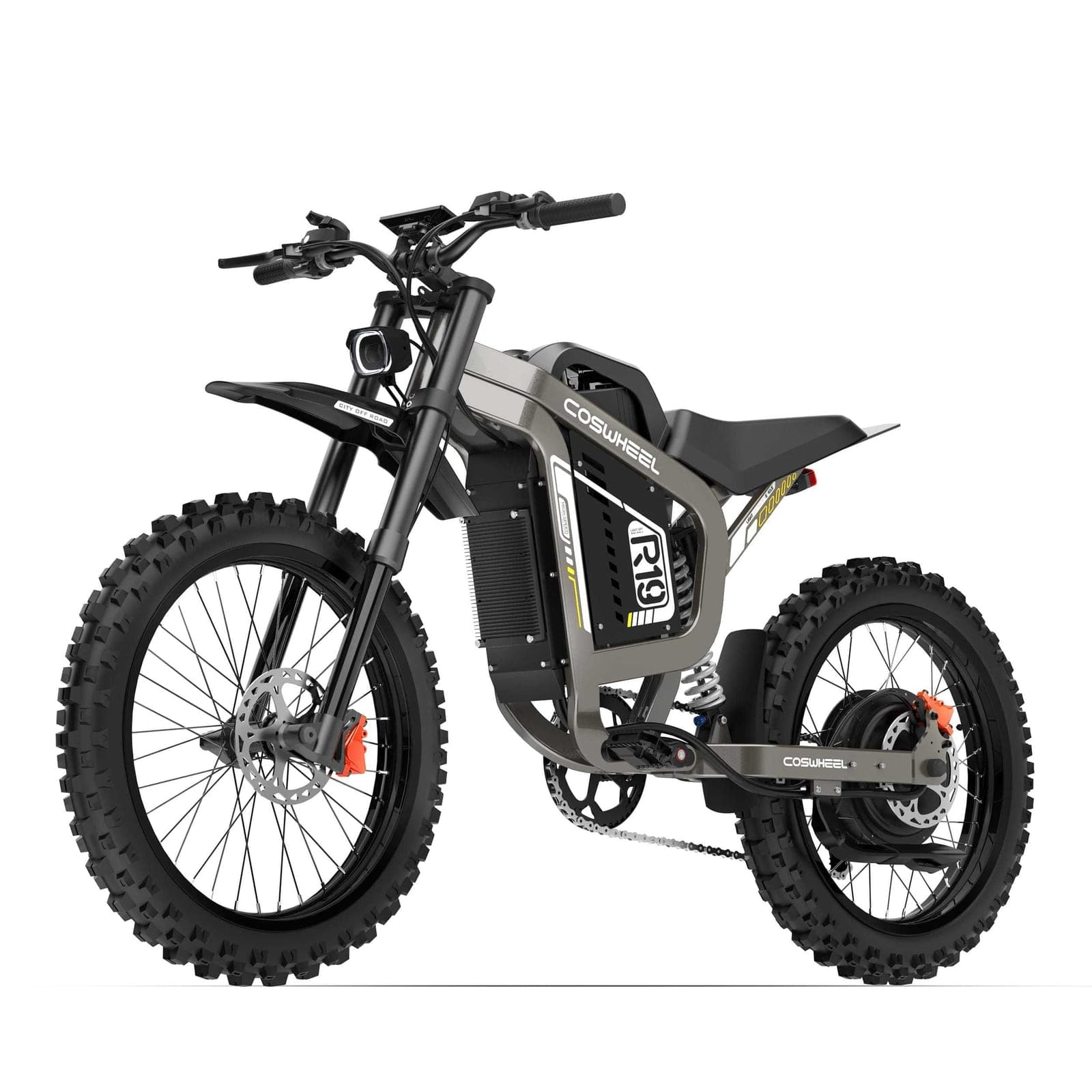
- Open the "Pantry" tab and drop in the photo ("Drag a product photo here, or click to choose").
- After the upload you'll see "We see: …" — what we recognise in the photo. Give it a name ("Coswheel R19") and fill in "What is it? (goes into the prompt)": "electric dirt bike with a grey metal frame, black off-road tyres and orange brake calipers". These words go into the description of every post with this product.
- Save.
What kind of photo works best:
| Good | Avoid |
|---|---|
| The whole product in frame, slightly angled, at seat height | Cropped wheels, a strong top-down perspective |
| Even light, no hard shadows (a studio shot is ideal) | Flash, mixed yellow/blue light |
| A calm background — white, a wall, the floor | Other bikes and racks behind it |
| A sharp photo with the model's real colors | Filters, HDR, a heavily compressed JPEG |
The free plan has room for 3 product photos in the Pantry — your first post needs one.
Step 5. Languages and voice (optional, 2 minutes)
The project settings have a few more cards that shape the caption:
- Captions → Languages — which language (or languages, up to three) your captions are written in. For Electric Express it's Bulgarian. If you also have international customers, add English — the caption is written in both, and when you publish you choose both together or just one.
- Voice — paste 3–5 captions of your own that you like. We follow their voice, rhythm and length. If you've already connected Instagram, click "Import from Instagram" and pick your best-performing posts.
- Caption emojis — none, subtle or expressive. For bikes, "Subtle" is just right.
You can skip all of this for your first post and come back later.
Step 6. Generate the post (1 minute of work, about a minute of waiting)
From the project, click "New post". The form has a few fields — here's what we wrote for our example.
Format
"Post" (square) is the classic for your profile. "Portrait" takes up the most space on a phone screen. "Story" is 9:16 for Stories and Reel covers. We start with "Post".
Featured product
Under "Feature a product (optional)", pick the bike from the Pantry. This is the difference between "some electric bike" and your Coswheel R19.
Scene and message
This is the description. The rule: don't describe the product — the photo does that. Describe who, where, what light, what mood and what the message is. Our text:
A man in a helmet and a black jacket rides the bike across the square in front of the Alexander Nevsky Cathedral in Sofia, sunset, low golden light, the cathedral slightly blurred in the background, cars blurred in motion, a little dust behind the rear wheel. Energetic, urban, cinematic. The post presents the R19 as a bike for the city.
What each part does:
- "A man in a helmet… rides" — the rider gives scale and movement; the product stays the same, only the scene is new.
- "in front of the Alexander Nevsky Cathedral in Sofia" — a famous landmark the model knows. The gilded domes and yellow cobblestones make it recognisable.
- "sunset, low golden light, slightly blurred in the background" — light sets the atmosphere, and the blur keeps attention on the product.
- "The post presents the R19 as a bike for the city" — the caption will develop this without you writing it twice.
Headline on the image
In "Headline on the image (optional)" you can write a short message that becomes part of the image — up to 60 characters, one line, in any alphabet, for example "-15% on the Coswheel R19 until the end of the month". The model draws it in your brand font and keeps it inside Instagram's safe zone (where the app's interface doesn't cover it). We generated the first image below without a headline and added one afterwards with a single fine-tune — you'll see both.
Logo, hashtags, HD
- The "Add your logo" checkbox comes pre-ticked from Step 3. No extra credits.
- "Hashtag sets" — if you have a set in the settings ("#ElectricExpress #ElectricDirtBike #Sofia"), it's always included, and we add a few more on the topic.
- HD is for paid plans and uses more credits — you don't need it for your first post.
Click "Generate post". You'll see "Handing your post to the bakery…". The image and the caption are generated in parallel; it's usually ready within a minute.
Step 7. Review and fine-tune (2 minutes)
The post page shows the image and the caption. Here's what Electric Express got from the studio photo:
BeforeAfterThe image. If the scene is right but a small thing is in the way, don't regenerate from scratch — in "Fine-tune this image" write only the change: "remove the car on the left", "warmer light" or, as Electric Express did, the promotion on the image. The instruction, word for word (translated from Bulgarian):
Add the headline "-15% on the Coswheel R19 until the end of the month" top left in the sky, in the brand font, without touching the rider, the bike or the cathedral
"Apply change" keeps the composition and applies only that:
Before After
If you want a completely new scene from the same description, use "Regenerate image". Fine-tunes and regenerations use credits; the free plan includes one free regeneration.
The logo. In the "Logo" row on the post you can switch the logo on or change its corner on the finished post — free, with no new generation.
The caption. The caption is up to 2,200 characters, in your project's language(s), with the hashtags added once at the end. Here's what Electric Express got, with no manual edits (the original is in Bulgarian; this is a free translation):
Sofia is your track. 🏙️
Coswheel R19 — a full-size electric dirt bike built for those who don't fit inside the lines. A massive frame, off-road tyres, an inverted front fork and chain drive — everything you need to take the streets with character and power.
Turn heads. Feel the rush. Zero emissions. ⚡ This is how to move through the city — no compromise and no noise. Find your R19 at electric-express.com.
#CoswheelR19 #ElectricDirtBike #ElectricExpress #ЕбайкБългария #ElectricMoto #София #EMoto #RideElectric
You have three buttons: "Edit" (change it by hand — for example, add the exact end date of the promotion), "Regenerate caption" (a new variant in the same voice) and "Copy caption". If you edit by hand, your edit is what gets published.
More in the same style
Like the image but want a second post in another location? Under "Continue with this post" choose "More like this" → "Generate variant" and describe the new scene in the form — for example "in front of the National Palace of Culture, same light". PostBakery uses the finished image as a style reference: the same setting, light and palette, a new scene. The reference costs nothing extra; the new post costs the usual one credit.
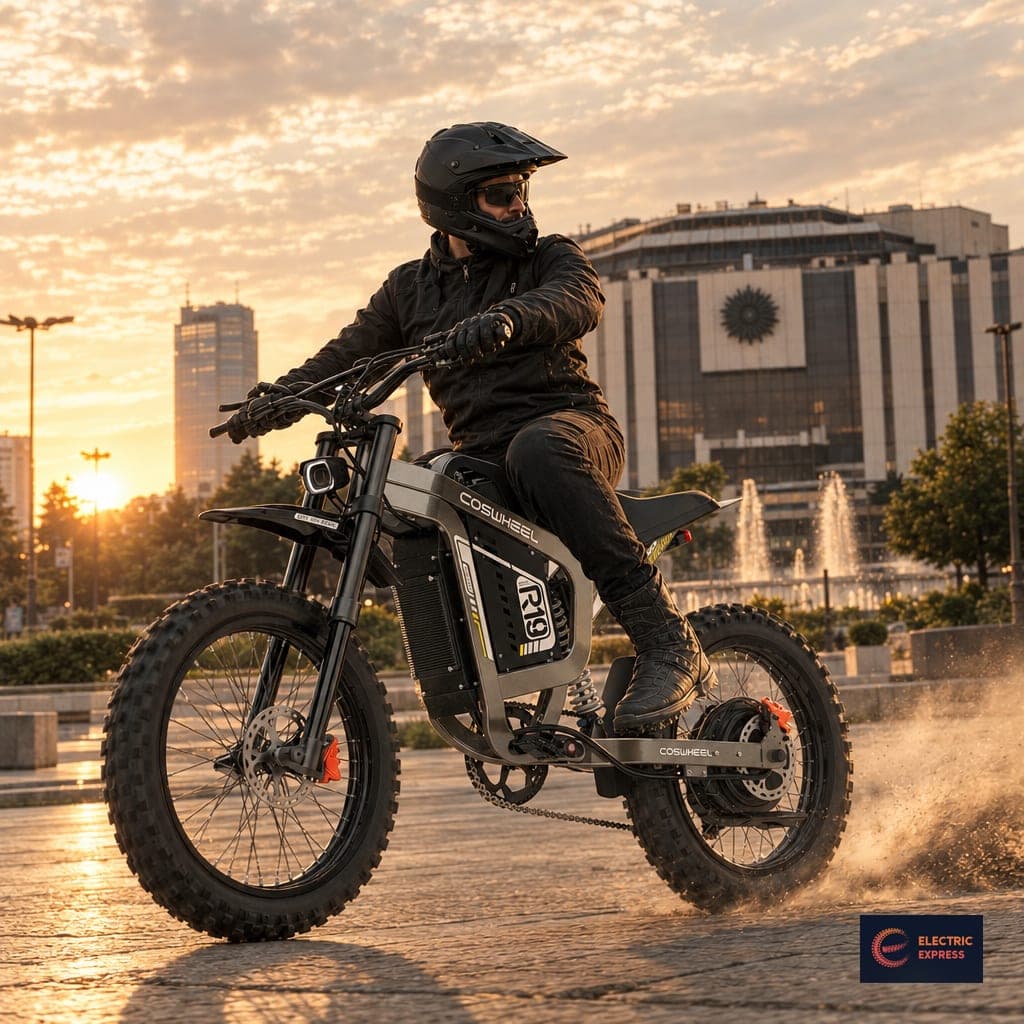
The second caption came in the same voice, but with the new place (translated):
Sofia, NDK — where style meets power. ⚡
The Coswheel R19 isn't just a bike. A massive metal frame, aggressive off-road tyres and chain drive, made for those who ride by their own rules — even in the middle of the city.
Get yours at electric-express.com 🔥
Story version. In the same "Continue with this post" card, "Story version" → "Create story" creates a 9:16 Story using the same description, product, headline and logo, for 1 credit — handy for a story with a link sticker to the promotion.
Step 8. Publish (2 minutes the first time, then 10 seconds)
You have two paths.
A. By hand. "Download" saves the image; on a phone, "Share" opens the system share sheet so you can send it straight to Instagram. The caption — with "Copy caption".
B. Straight from PostBakery. The first time, connect your accounts: in the project settings, the "Connected platforms" card → "Connect Facebook & Instagram". Log in with Facebook and choose your shop's Page; if an Instagram Business or Creator account is linked to it, it comes along. (Publishing to Instagram only works through a business or creator profile linked to a Facebook Page — that's Meta's rule, not ours.) After that, every post has a "Publish" card: choose the accounts and click "Publish to all", or publish to just one. If your caption is in two languages, you choose whether to post both together or only the primary one.
Schedule. On paid plans the "Schedule" card lets you pick a date and time — say Friday, 6 p.m. — and the post goes out on its own, even while you sleep. A bike promotion makes sense on a Friday afternoon, when people are planning their weekend.
Once published, a stats row appears under the post — reach, likes and saves for Instagram; reach, views and reactions for Facebook — so you can see what works without leaving PostBakery.
Checklist for your first post
- Account confirmed, dashboard open
- A project with 2–4 colors and style notes
- Logo as a transparent PNG, corner and size chosen
- One clean product photo in the Pantry, with a name and description
- A description of who, where, light, mood, message — no description of the product
- A headline on the image of up to 60 characters (optional)
- Caption reviewed, promotion end date added
- Facebook Page and Instagram connected (or the image downloaded)
What's next
With your second and third free posts, try "Portrait" for the same product in a different scene — say, a street on a rainy evening — and see which format works better on your profile. The "Ideas" tab in your project suggests posts for the whole week based on your brand and the season, so your next promotion doesn't start from a blank page. And if you have questions along the way, write to us — we read everything.
Plans and limits are on the pricing page; for the full feature list, see what PostBakery does. Curious why we built it? Read how PostBakery started.